Creative Production
Creative requests, handled from brief to final file.
Canopy Create gives your school one place to order flyers, brochures, class catalogs, logos, brand guidelines, website updates, and more from Canopy's designers—then follow the work, review proofs, request changes, approve, and download the finished files.
The production gap
The work should not disappear into an email thread.
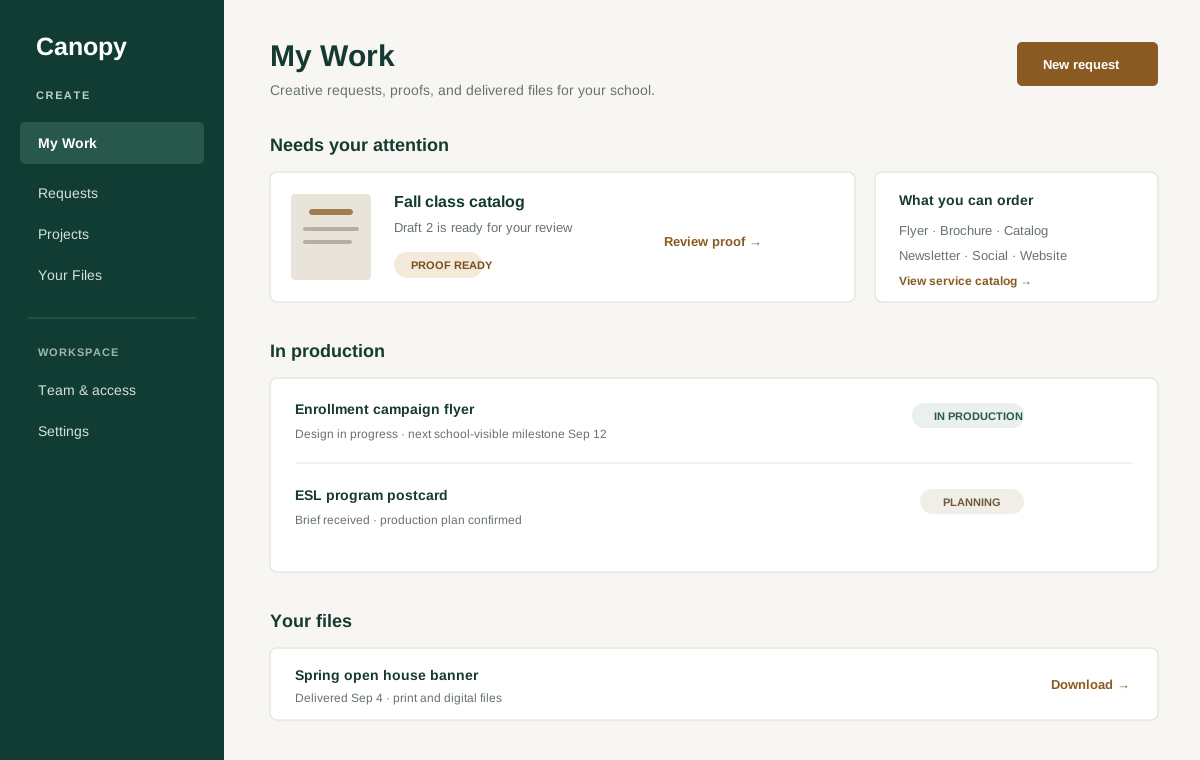
A design request often begins with a scattered brief, moves through attachments and follow-up questions, and ends with multiple proof versions in multiple inboxes. Create keeps the request, production status, conversation, proof decisions, and delivered files together around one job.
- Visible production status
- Proofs and decisions
- Delivered final files
How Create works
From a clear request to an approved final file
- 1
Choose the work you need
Browse Order design work: each piece shows examples of past work, who designs it, how long it usually takes, and its price—from flyers, postcards, brochures, banners, fact sheets, and class catalogs to logo design and brand guidelines. Filter by type, price, turnaround, or designer, or describe something else and we quote it.
- 2
Send a useful brief
Complete the structured request, add the audience, format, target date, source material, and attachments, and submit it to the Canopy production team.
- 3
Follow production and review proofs
See what is in production and what needs your attention. Review each proof, pin changes to the relevant page, answer questions, and keep earlier draft versions available for reference.
- 4
Approve and retrieve the final work
Authorized school staff approve the current proof or request another round. When the job is complete, the final files remain available from your Create workspace.
Proof review
Feedback belongs on the proof—not in a chain of replies
Open the current proof, select the page, describe the change, and attach a reference file when helpful. Create groups the requested changes into one clear decision for the production team while preserving every earlier draft.
Inside Create
One desk for every creative job
The request, production, proof, and delivery tools your school needs to keep creative work moving.
- Order design work: a storefront of services with examples of past work, designers, turnaround, and prices
- Logo design and brand identity, quoted before any work starts
- Brief details, source files, reference attachments, and target dates
- A school-facing view of work needing attention and work in production
- Page-specific proof feedback, questions, and revision rounds
- Role-aware approval for the current proof version
- A retained library of delivered final files
Bring the next job to the demo
See your next creative request in Create
Bring one upcoming flyer, catalog, newsletter, website update, or campaign piece to the walkthrough and see how the request moves through review and delivery.