Campaign Pages
Campaign pages that turn interest into inquiries.
Canopy Campaigns gives every promotion a focused page—spotlight a class or program, collect inquiries, or help learners find the right class—built from your live ASAP classes and PhotoVault photos, with every inquiry landing in one leads inbox.
The landing gap
Every promotion needs a page to land on.
A social post, flyer, or newsletter can make someone curious, but a general homepage often loses them. Campaigns gives each push its own page with one clear next step, keeps the class details current from ASAP, and shows what happened after people arrived.
- A focused page
- Live classes and photos
- Inquiries in one inbox
How Campaigns works
From a goal to a page that works
- 1
Choose a goal
Spotlight a class or program, collect inquiries for an upcoming start, or help learners find their classes by what they want to learn.
- 2
Build it from what you already have
Pull classes, dates, and registration links from Canopy ASAP and choose photos from PhotoVault. From a class or program in ASAP, Promote this starts the page for you.
- 3
Share the link
Put the page behind your social posts, newsletters, flyers, and website buttons so every promotion lands in the same place.
- 4
Follow up and see what worked
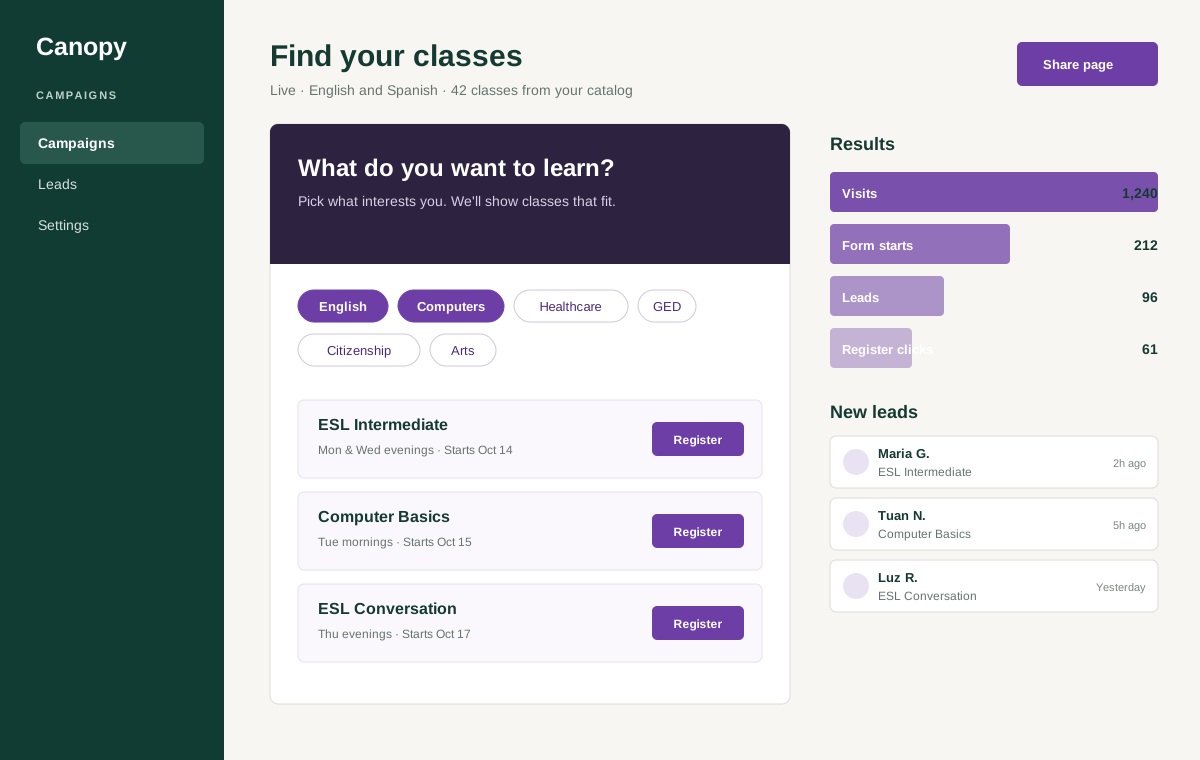
Inquiries arrive in one leads inbox. Results show visits, form starts, leads, and registration clicks for each campaign.
Class finder
Find your classes, in English or Spanish
The class finder lets a learner pick what they want to learn in English or Spanish, see matching classes from your live catalog, and receive their results by email with a private link to come back to.
Inside Campaigns
Everything a focused enrollment push needs
The pages, class data, and follow-up your team needs for every enrollment push.
- Spotlight, inquiry, and class-finder campaign pages
- Classes, dates, and registration links kept current from Canopy ASAP
- School photos chosen from PhotoVault
- One leads inbox for every inquiry the pages collect
- Results for each campaign: visits, form starts, leads, and registration clicks
- Archive finished campaigns to keep the list tidy
Bring the next push to the demo
Bring your next enrollment push
Tell us which class, program, or start date you need to fill, and we will show you the campaign page that goes with it.